
In the previous post of Introduction of dotnet-binding-util, we already learned what it is about. I will sometimes call it the tool for short.
In the post, I will go thorough the core part of the tool, artifact and NuGet metadata, the way in which a NuGet package links to a native Android artifact.
Where they are
When checking out the tool, you will find there is a folder of android following the below structure.
|- path-to-the-tool
    |- src
        |- android
            |- android.arch.core
            |- android.arch.lifecycle
NOTE: The idea repo of the tool will be for both the iOS and Android binding libraries. Hence, there are two folders: one for android, one for ios.
In this android folder, each artifact group will have its own folder. Inside an artifact group folder, there will be
group.json- Optional. Defines the info of the group such as name, dotnet8, etc.mavens.props- Optional. Defines custom Maven repositories.icon.png- Optional. The icon of the nested generated NuGet packagesnested folders - Each folder is a nested artifact within the group.
Inside an artifact folder, we will have
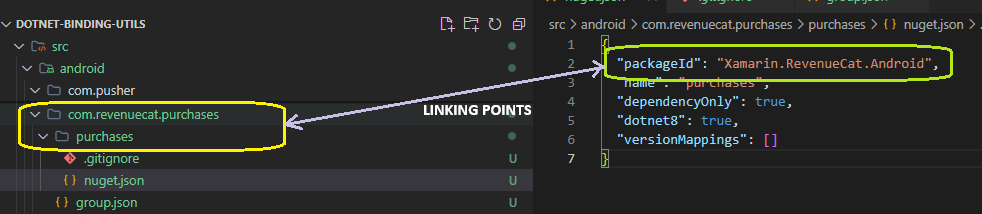
nuget.json- Required. Defines the info of the associated NuGet packagepackageId- Required. It’s the package ID of associated NuGet package. If not present, it will be the Pascal version of artifact group and artifact names combined.name- Optional. Normally it’s the name of the artifact. We can make it human friendly and SEO friendly.dependencyOnly- Optional. Default totrue. Marks that no binding should be generated.versionMapping- Optional. This one is complex and complicated. It’s currently in use for Google related packages only.
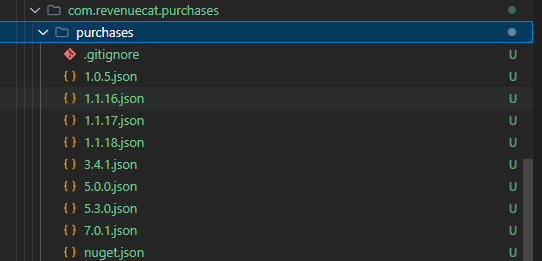
x.y.z.p.jsonfilesThe file name - The version of the native artifact
The file content:
revision: Optional. The revision of the Nuget packagefallbackVersion: Optional. The version which we should fallback to and this version actually has no associated NuGet package
x.y.z.p.fixed.jsonfiles: Contains the fixed versions of the dependencies of the artifact when creating the binding library. We will learn more details about it in a concrete example.
For all of that long explanation, the main point is to define the way an Android artifact linked to a NuGet package.
How to update the existing metadata
These metadata is continuously updated by the NuGet packages’ owners. Hence, we will have to keep them up to date right before we want to do any new binding libraries or upgrade existing ones.
This update task is done by running this command in the BASH terminal
sh fetch.sh
This will check all existing metadata in our folder and check with NuGet.org to find any new versions added and/or modified with new revisions.
After the command is done, we must commit the change back to the tool for later reference.
How to add metadata for an Android binding NuGet package
Here are steps to add metadata for an Android binding NuGet package:
Find the artifact group and artifact name of the native library
Create folders for artifact group and artifact
Create
nuget.jsonfilepackageId: The Nuget package id.
Run
sh fetch.shWait and see the result
Commit the new metadata
Example of adding metadata for Xamarin.RevenueCat.Android which has the native library is com.revenuecat.purchases:purchases.
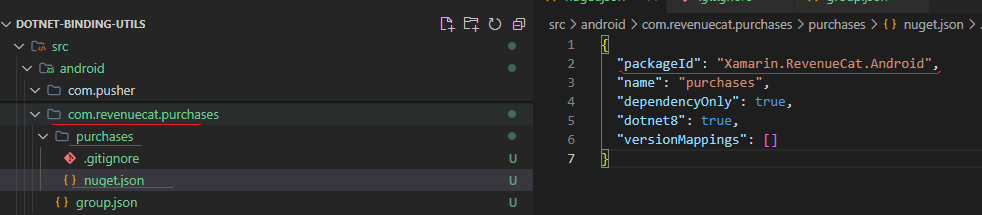
The result after running the fetch.
Wraps up
This is the basic info of the metadata, the core part of the tool. We will need to learn a bit further for special cases as we create binding libraries using the tool.
Happy binding!!!
About the author
Tuyen is a very skilled C#.NET developer with many years of building large systems for banking, real estate and ecommerce. He is also very strong in mobile application development across different stacks like Flutter, ReactNative, Xamarin.Forms/.NET MAUI.
Comments
Join the discussionNo comments yet. Be the first to comment.
.NET binding libraries
In this series, I will introduce the way I create binding libraries for .NET Android and .NET iOS.